After installing x11vnc there were the dreaded "unsupported security types" error message.
I tried several things, including disabling the "wayland vnc server" in " /etc/gdm3/custom.conf".
Nothing worked, in the end I just installed "lightdm" instead of the "gdm3". And after enabling screen sharing in the gui settings I had my vnc connection up and running again.
Sunday, September 30, 2018
Monday, May 7, 2018
EdgeRouter X VPN connection to mullvad.net
UPDATED here.
Backup your original settings by entering the gui interface, select the system tab in the lower part of the window and choose "Back Up Config"
Copy these files that you obtained from mullvad.net to the edgeos router:
Here I am using the "mullvad_no.conf", but you should replace that with the location you are using.
Edit the "mullvad_no.conf" file and insert "/config/auth" before all mullvad filenames (line 21-23 for me)
Now, ***EDIT*** the following text to your settings:
Changes would probably be in line 3,10,11,16 and 22, outlined in blue. My router are using 10.0.0.1 as the LAN address, eth4 connected to my ISP.
On the edgeos router enter the command "configure" and paste the edited text into the terminal.
Then enter the "commit" and "save" commands. Browse to your router web interface and refresh to observe the difference.
And check the am.i.mullvad link...
Backup your original settings by entering the gui interface, select the system tab in the lower part of the window and choose "Back Up Config"
Copy these files that you obtained from mullvad.net to the edgeos router:
ubnt@ubnt:~$ ls -l /config/auth/
total 20
-rw------- 1 root vyattacf 6296 May 7 13:38 mullvad_ca.crt
-rw------- 1 ubnt vyattacf 2202 May 7 13:54 mullvad_crl.pem
-rw------- 1 ubnt vyattacf 500 May 7 14:16 mullvad_no.conf
-rw------- 1 ubnt vyattacf 19 May 7 14:09 mullvad_userpass.txt
ubnt@ubnt:~$
Here I am using the "mullvad_no.conf", but you should replace that with the location you are using.
Edit the "mullvad_no.conf" file and insert "/config/auth" before all mullvad filenames (line 21-23 for me)
auth-user-pass /config/auth/mullvad_userpass.txt
ca /config/auth/mullvad_ca.crt
crl-verify /config/auth/mullvad_crl.pem
Now, ***EDIT*** the following text to your settings:
#openvpn to mullvad
set interfaces openvpn vtun0 config-file /config/auth/mullvad_no.conf
set interfaces openvpn vtun0 description 'Mullvad VPN'
set interfaces openvpn vtun0 enable
set service nat rule 5000 description MVPN
set service nat rule 5000 log disable
set service nat rule 5000 outbound-interface vtun0
set service nat rule 5000 source address 10.0.0.0/24
set service nat rule 5000 type masquerade
set service nat rule 5001 description default
set service nat rule 5001 log disable
set service nat rule 5001 outbound-interface eth4
set service nat rule 5001 source address 10.0.0.0/24
set service nat rule 5001 type masquerade
set protocols static table 1 interface-route 0.0.0.0/0 next-hop-interface vtun0
set firewall modify mullvad_route rule 10 description 'MVPN'
set firewall modify mullvad_route rule 10 source address 10.0.0.0/24
set firewall modify mullvad_route rule 10 modify table 1
set interfaces switch switch0 firewall in modify mullvad_route
Changes would probably be in line 3,10,11,16 and 22, outlined in blue. My router are using 10.0.0.1 as the LAN address, eth4 connected to my ISP.
On the edgeos router enter the command "configure" and paste the edited text into the terminal.
Then enter the "commit" and "save" commands. Browse to your router web interface and refresh to observe the difference.
And check the am.i.mullvad link...
Saturday, January 6, 2018
WAN IP address from Ubiquiti EdgeRouter ER-X
I got myself a new router, an Ubiquiti EdgeRouter ER-X , and when I tried to apply my old methods from the WNR2000v5 I discovered that the web pages returned were full of javascript. I could not find any WAN values in the files.
And that was just as well, the edge router features a full OS, with python pre installed! I set it up with eth4 as the WAN port.
The only caveat was the
show interfaces ethernet eth4 brief
did not work in a script. The command
/opt/vyatta/bin/vyatta-op-cmd-wrapper show interfaces ethernet eth4 brief
has to be used for it to work.
So after setting it up to run via crontab with the command
sudo -e crontabthe script were up and running.
The working python script:
#!/usr/bin/python
import re, os, ftplib, pickle, StringIO
def touch(fname, times=None):
with open(fname, 'a'):
os.utime(fname, times)
cmd_path = '/opt/vyatta/bin/vyatta-op-cmd-wrapper'
cmd_res = os.popen(cmd_path+ ' show interfaces ethernet eth4 brief')
data = cmd_res.read()
cmd_res.close()
# Edgeos show interface command returns
# eth4 xxx.xxx.xxx.xxx
p = re.compile('eth4(\s*)(\d*).(\d*).(\d*).(\d*)')
m = p.search(data)
#m.groups()[0] is white space
if (m and len(m.groups()) == 5):
current_ip = (m.groups()[1], m.groups()[2], m.groups()[3], m.groups()[4])
try:
last_ip = pickle.load(open('/home/user/myip/lastip', "rb" ))
except IOError:
last_ip = (1,2,3,4)
if current_ip != last_ip:
pickle.dump(current_ip,open('/home/user/myip/lastip', "wb" ))
data ='<html><head><title>My IP</title></head><b>My IP:\
%d//%d//%d//%d</b></font></p></body></html>\
'%(int(m.groups()[1]),int(m.groups()[2]),int(m.groups()[3]),int(m.groups()[4]))
output = StringIO.StringIO(data)
ftp = ftplib.FTP('ftp.server.org', 'username','password')
ftp.cwd('pub')
ftp.storlines('STOR index.html', output)
ftp.close()
else:
touch('/home/user/myip/lastip')
import re, os, ftplib, pickle, StringIO
def touch(fname, times=None):
with open(fname, 'a'):
os.utime(fname, times)
cmd_path = '/opt/vyatta/bin/vyatta-op-cmd-wrapper'
cmd_res = os.popen(cmd_path+ ' show interfaces ethernet eth4 brief')
data = cmd_res.read()
cmd_res.close()
# Edgeos show interface command returns
# eth4 xxx.xxx.xxx.xxx
p = re.compile('eth4(\s*)(\d*).(\d*).(\d*).(\d*)')
m = p.search(data)
#m.groups()[0] is white space
if (m and len(m.groups()) == 5):
current_ip = (m.groups()[1], m.groups()[2], m.groups()[3], m.groups()[4])
try:
last_ip = pickle.load(open('/home/user/myip/lastip', "rb" ))
except IOError:
last_ip = (1,2,3,4)
if current_ip != last_ip:
pickle.dump(current_ip,open('/home/user/myip/lastip', "wb" ))
data ='<html><head><title>My IP</title></head><b>My IP:\
%d//%d//%d//%d</b></font></p></body></html>\
'%(int(m.groups()[1]),int(m.groups()[2]),int(m.groups()[3]),int(m.groups()[4]))
output = StringIO.StringIO(data)
ftp = ftplib.FTP('ftp.server.org', 'username','password')
ftp.cwd('pub')
ftp.storlines('STOR index.html', output)
ftp.close()
else:
touch('/home/user/myip/lastip')
Monday, September 18, 2017
Setup realvnc server on raspberry headless using tightvncviewer
When I tried to connect to my headless raspberry via tightvncviewer I got the following message:
It appears that you have to install a viewer from realvnc ($? or registration?) in order to connect.
Allowing me to change the options for the default vnc server connected to the "screen" (port 5900 or :0) on the raspberry.
It appears that you have to install a viewer from realvnc ($? or registration?) in order to connect.
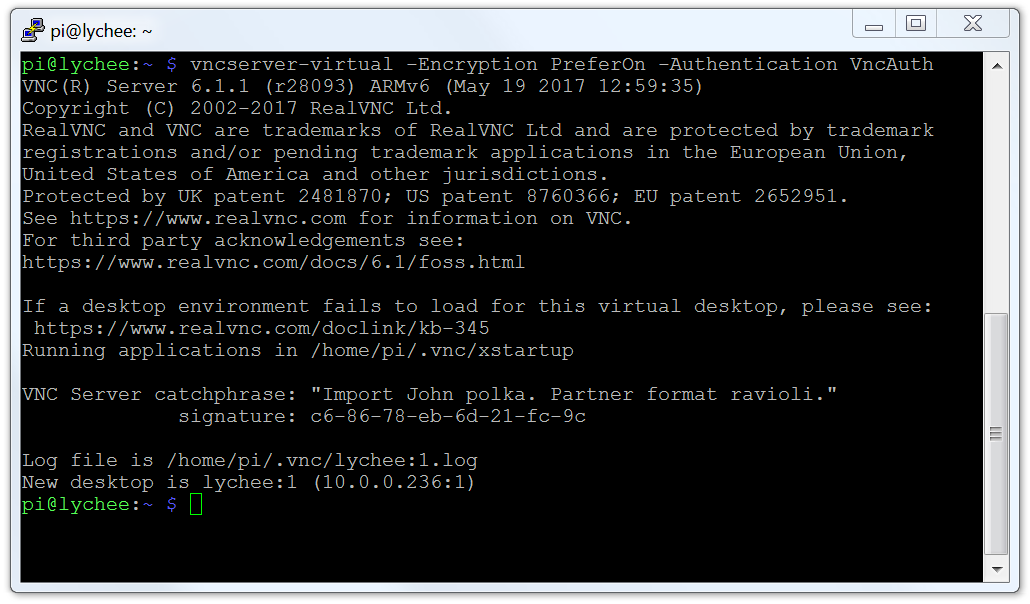
So I logged in to the raspberry via ssh and started a virtual vnc screen:
vncserver-virtual -Encryption PreferOn -Authentication VncAuth
This starts a new, virtual vnc server with the standard vnc authentications, tightvncviewer can connect to this one.
From this vnc connection I started a realvncviewer session to "localhost"
Accessing the options on the :0 realvnc server via realvnc viewer from a virtual (:1) realvncviewer from tightvncviewer.
From the options change Security/Authentication from "UNIX password" to "VNC password".
Now it is possible to connect directly to the realvncserver from tightvncviewer.
Thursday, January 12, 2017
Fast forwarding the std::next_permutation algorithm
I started my computer with a project that looks more and more like Sisyfos work.
It is trying to solve a puzzle by running through a set of permutations, and it is using std::next_permutation.
However, a day into the computation I realized that the algorithm could be further improved. Should I stop the calculation and restart it? Or let it continue, with the ineffective algorithm?
Looking at the internet I found an in depth explanation of std::next_permutation Implementation Explanation. std::next_permutation will from a starting point increase the permutation in an lexical fashion until it rolls over and returns false:
std::vector<int> skip_next_list = { 1,2,3,4, 5, 6, 7, 8, 9, 10, 11};do {//some work here} while (std::next_permutation(skip_next_list.begin(), skip_next_list.end()));My search had reached 309000000 when I aborted the job, so I needed to fast forward to that point. I realized that for 6 iterations (3!) it would update the last three entries of skip_next_list, for 24 (4!) the last four and so on.
So this is the skip_next_permutation function, fast forwarding to a number far into the sequence of std::next_permutation.
template<typename It> void skip_next_permutation(uint64_t skip_num, It begin, It end) { if (skip_num <= 0) return; // does not have to be an error //build a lut of factorials, this could be a static std::vector<uint64_t> factorials; factorials.push_back(1); /// 0! == 1 long idx = 1; long input_length = end - begin; do { factorials.push_back(factorials[idx-1] * idx); } while (factorials[++idx - 1] <= skip_num); // // now start to loop, find the factorial that is one smaller than the number we want to skip forward
long my_inc = factorials.size() - 2; // always 2 lower than factorials.size() do { int quotient = skip_num / factorials[my_inc]; skip_num = skip_num%factorials[my_inc]; //the remaider are the remaining skip_num if (skip_num == 0 && quotient == 0) goto end_loop; std::swap(begin[input_length - my_inc - 1], begin[input_length - my_inc + quotient - 1]); std::sort(begin + input_length - my_inc, end); //avoid with clever management? my_inc--; } while (my_inc >= 1); end_loop: return; }The following table shows the factorials std::next_permutation algorithm exhausted, the number used for skip_next_permutation and the time std::next_permutation used.
Factorial
|
Number
|
Time / ms
|
|---|---|---|
9!
|
362 879
|
0.9
|
12!
|
39 916 799
|
94.1
|
13!
|
6 227 020 799
|
14 436.6
|
The fast forward function skip_next_permutation uses approximately 0.009 ms for all the values.
Monday, November 28, 2016
More sensors for Tellstick local access
After obtaining local network access to the Tellstick net I also have a wind sensor and a rain sensor close to my Tellstick net. Again, translating the Telldus .cpp code to python, the following python code gives the same results as the Telldus Live page. The code for the 1984/1994 sensors are identical except for the:
checksum = checksum + 0x1 + 0x9 + 0x8 + 0x4
vs
checksum = checksum + 0x1 + 0x9 + 0x9 + 0x4checksum calculation. Here are the python code.
def decode2914(inp):
#source:telldus-core/service/ProtocolOregon.cpp@c9567f
#// rain
value = int(inp, 16)
messageChecksum1 = value & 0xF
value = value >> 4
messageChecksum2 = value & 0xF
value = value >> 4
totRain1 = value & 0xF
value = value >> 4
totRain2 = value & 0xF
value = value >> 4
totRain3 = value & 0xF
value = value >> 4
totRain4 = value & 0xF
value = value >> 4
totRain5 = value & 0xF
value = value >> 4
totRain6 = value & 0xF
value = value >> 4
rainRate1 = value & 0xF
value = value >> 4
rainRate2 = value & 0xF
value = value >> 4
rainRate3 = value & 0xF
value = value >> 4
rainRate4 = value & 0xF
value = value >> 4
battery = value & 0xF #// PROBABLY battery
value = value >> 4
rollingcode = ((value >> 4) & 0xF) + (value & 0xF)
checksum = ((value >> 4) & 0xF) + (value & 0xF)
value = value >> 8
channel = value & 0xF
checksum = checksum + totRain1 + totRain2 + totRain3 + totRain4 + totRain5 + totRain6 +\
rainRate1 + rainRate2 + rainRate3 + rainRate4 +\
battery + channel + 0x2 + 0x9 + 0x1 + 0x4
if (((checksum >> 4) & 0xF) != messageChecksum1 or (checksum & 0xF) != messageChecksum2):
#// checksum error
return ""
totRain = ((totRain1 * 100000) + (totRain2 * 10000) + (totRain3 * 1000) +\
(totRain4 * 100) + (totRain5 * 10) + totRain6)/1000.0*25.4
rainRate = ((rainRate1 * 1000) + (rainRate2 * 100) + (rainRate3 * 10) + rainRate4)/100.0*25.4
return "%f\t%f"%(totRain, rainRate)
def decode1994(inp):
#source:telldus-core/service/ProtocolOregon.cpp@c9567f
#wind
value = int(inp, 16)
crcCheck = value & 0xF
value = value >> 4
messageChecksum1 = value & 0xF
value = value >> 4
messageChecksum2 = value & 0xF
value = value >> 4
avg1 = value & 0xF
value = value >> 4
avg2 = value & 0xF
value = value >> 4
avg3 = value & 0xF
value = value >> 4
gust1 = value & 0xF
value = value >> 4
gust2 = value & 0xF
value = value >> 4
gust3 = value & 0xF
value = value >> 4
unknown1 = value & 0xF
value = value >> 4
unknown2 = value & 0xF
value = value >> 4
direction = value & 0xF
value = value >> 4
battery = value & 0xF #// PROBABLY battery
value = value >> 4
rollingcode = ((value >> 4) & 0xF) + (value & 0xF)
checksum = ((value >> 4) & 0xF) + (value & 0xF)
value = value >> 8
channel = value & 0xF
checksum = checksum + unknown1 + unknown2 + avg1 + avg2 + avg3 + gust1 + gust2 + gust3 + direction + battery + channel
checksum = checksum + 0x1 + 0x9 + 0x9 + 0x4
if (((checksum >> 4) & 0xF) != messageChecksum1 or (checksum & 0xF) != messageChecksum2):
#// checksum error
return ""
avg = ((avg1 * 100) + (avg2 * 10) + avg3)/10.0
gust = ((gust1 * 100) + (gust2 * 10) + gust3)/10.0
directiondegree = 22.5 * direction
return '%f\t%f\t%f'%(avg, gust, directiondegree)
def decode1984(inp):
#source:telldus-core/service/ProtocolOregon.cpp@c9567f
#// wind
value = int(inp, 16)
crcCheck = value & 0xF
value = value >> 4
messageChecksum1 = value & 0xF
value = value >> 4
messageChecksum2 = value & 0xF
value = value >> 4
avg1 = value & 0xF
value = value >> 4
avg2 = value & 0xF
value = value >> 4
avg3 = value & 0xF
value = value >> 4
gust1 = value & 0xF
value = value >> 4
gust2 = value & 0xF
value = value >> 4
gust3 = value & 0xF
value = value >> 4
unknown1 = value & 0xF
value = value >> 4
unknown2 = value & 0xF
value = value >> 4
direction = value & 0xF
value = value >> 4
battery = value & 0xF #// PROBABLY battery
value = value >> 4
rollingcode = ((value >> 4) & 0xF) + (value & 0xF)
checksum = ((value >> 4) & 0xF) + (value & 0xF)
value = value >> 8
channel = value & 0xF
checksum = checksum + unknown1 + unknown2 + avg1 + avg2 + avg3 + gust1 + gust2 + gust3 + direction + battery + channel
checksum = checksum + 0x1 + 0x9 + 0x8 + 0x4
if (((checksum >> 4) & 0xF) != messageChecksum1 or (checksum & 0xF) != messageChecksum2):
#// checksum error
return ""
avg = ((avg1 * 100) + (avg2 * 10) + avg3)/10.0
gust = ((gust1 * 100) + (gust2 * 10) + gust3)/10.0
directiondegree = 22.5 * direction
return '%f\t%f\t%f'%(avg, gust, directiondegree)
Just add some more checks in the while loop
while 1:
try:
data,(address, port) = sock.recvfrom(1040)
#print data
if (data.split(":")[6][6:10]=="F824"):
#print data.split(":")[7][5:5+14]
print decodeF824(data.split(":")[7][5:5+14])
elif (data.split(":")[6][6:10]=="1984"):
#print data.split(":")[7][5:5+16]
print decode1984(data.split(":")[7][5:5+16])
elif (data.split(":")[6][6:10]=="2914"):
#print data.split(":")[7][5:5+16]
print decode2914(data.split(":")[7][5:5+16])
else:
print data
#fp.write(data + '\n');
#fp.flush()
except KeyboardInterrupt:
print "done"
#fp.close()
break
except: # time out, try again
pass
Friday, November 25, 2016
Local access to Tellstick net via python
I installed a Tellstick net and were pretty baffled that there were no obvious way to access the thing locally. At least according to my internet search.
Telldus are providing source codes for free, the only problem seems to be how the information is arranged.
By piecing together information found various places I came up with the following:
Send an udp message on port 30303, all Tellstick net devices on the local network will respond to this with a string containing some unit specific information AND the IP address on the network.
sock.sendto(DISCOVERY_PAYLOAD, (DISCOVERY_ADDRESS, DISCOVERY_PORT))
data, (address, port) = sock.recvfrom(1024)
Then send a command that will make the Tellstick net echo the sensor information back via upd:
sock.sendto("B:reglistener", (address, 42314)) #I really love those port numbers
Read the upd port and filter for the sensors you want. This is how a Oregon model F824 output could look like:
7:RawDatah5:class6:sensor8:protocol6:oregon5:modeliF824s4:datai20E1730096074Ass
There are a lot regarding decoding Oregon data on the internet, I translated the telldus-core .cpp to python.
And it works, sometimes the output can be .1C or 1% humidity off compared to my Oregon display. The values match the values from Telldus Live though.
import socket
from datetime import timedelta
import time
def decodeF824(inp):
#source:telldus-core/service/ProtocolOregon.cpp@c9567f
value = int(inp, 16)
crcCheck = value & 0xF
value = value>>4
messageChecksum1 = value & 0xF
value = value >>4
messageChecksum2 = value & 0xF
value = value >> 4
unknown = value & 0xF
value = value >> 4
hum1 = value & 0xF
value = value >> 4
hum2 = value & 0xF
value = value >> 4
neg = value & 0xF
value = value >> 4
temp1 = value & 0xF
value = value >> 4
temp2 = value & 0xF
value = value >> 4
temp3 = value & 0xF
value = value >> 4
battery = value & 0xF
value = value >> 4
rollingcode = ((value >> 4) & 0xF) + (value & 0xF)
checksum = ((value >> 4) & 0xF) + (value & 0xF)
value = value >> 8
channel = value & 0xF
checksum += unknown + hum1 + hum2 + neg + temp1 + temp2 + temp3 + battery + channel + 0xF + 0x8 + 0x2 + 0x4
if ((((checksum >> 4) & 0xF) != messageChecksum1) or ((checksum & 0xF) != messageChecksum2)):
return ""
temperature = ((temp1 * 100) + (temp2 * 10) + temp3)/10.0
if (neg):
temperature = -temperature
humidity = (hum1 * 10.0) + hum2
retStr = "class:sensor;protocol:oregon;model:F824;id:" #14;temp:0.0;humidity:46;
retStr = '%s%d;temp:%1.1f;humidity:%d;'%(retStr,rollingcode,temperature,humidity)
return retStr
DISCOVERY_PORT = 30303
DISCOVERY_ADDRESS = '<broadcast>'
DISCOVERY_PAYLOAD = b"D"
DISCOVERY_TIMEOUT = timedelta(seconds=5)
sock = socket.socket(socket.AF_INET, socket.SOCK_DGRAM)
sock.setsockopt(socket.SOL_SOCKET, socket.SO_BROADCAST, 1)
sock.setsockopt(socket.SOL_SOCKET, socket.SO_REUSEADDR, 1)
sock.settimeout(DISCOVERY_TIMEOUT.seconds)
sock.sendto(DISCOVERY_PAYLOAD, (DISCOVERY_ADDRESS, DISCOVERY_PORT))
data, (address, port) = sock.recvfrom(1024)
print data, address, port
time.sleep(1)
#fp = open("tellstick.data", "w")
print "listening..."
#UDPSock.sendto("A:disconnect", (address,42314)) #will reboot the Tellstick net
sock.sendto("B:reglistener", (address, 42314))
while 1:
try:
data,(address, port) = sock.recvfrom(10240)
print data
if (data.split(":")[6][6:10]=="F824"):
print decodeF824(data.split(":")[7][5:5+14])
#fp.write(data + '\n');
#fp.flush()
except KeyboardInterrupt:
print "done"
#fp.close()
break
except: # time out, try again
pass
Subscribe to:
Posts (Atom)