Monday, May 7, 2018

EdgeRouter X VPN connection to mullvad.net

UPDATED here.

Backup your original settings by entering the gui interface, select the system tab in the lower part of the window and choose "Back Up Config"

Copy these files that you obtained from mullvad.net to the edgeos router:

ubnt@ubnt:~$ ls -l /config/auth/
total 20
-rw-------    1 root     vyattacf      6296 May  7 13:38 mullvad_ca.crt
-rw-------    1 ubnt     vyattacf      2202 May  7 13:54 mullvad_crl.pem
-rw-------    1 ubnt     vyattacf       500 May  7 14:16 mullvad_no.conf
-rw-------    1 ubnt     vyattacf        19 May  7 14:09 mullvad_userpass.txt
ubnt@ubnt:~$

Here I am using the "mullvad_no.conf", but you should replace that with the location you are using.

Edit the "mullvad_no.conf" file and insert "/config/auth" before all mullvad filenames (line 21-23 for me)

auth-user-pass /config/auth/mullvad_userpass.txt
ca /config/auth/mullvad_ca.crt
crl-verify /config/auth/mullvad_crl.pem

Now, ***EDIT*** the following text to your settings:
#openvpn to mullvad

set interfaces openvpn vtun0 config-file /config/auth/mullvad_no.conf
set interfaces openvpn vtun0 description 'Mullvad VPN'
set interfaces openvpn vtun0 enable

set service nat rule 5000 description MVPN
set service nat rule 5000 log disable
set service nat rule 5000 outbound-interface vtun0
set service nat rule 5000 source address 10.0.0.0/24
set service nat rule 5000 type masquerade

set service nat rule 5001 description default
set service nat rule 5001 log disable
set service nat rule 5001 outbound-interface eth4
set service nat rule 5001 source address 10.0.0.0/24
set service nat rule 5001 type masquerade

set protocols static table 1 interface-route 0.0.0.0/0 next-hop-interface vtun0

set firewall modify mullvad_route rule 10 description 'MVPN'
set firewall modify mullvad_route rule 10 source address 10.0.0.0/24
set firewall modify mullvad_route rule 10 modify table 1

set interfaces switch switch0 firewall in modify mullvad_route

Changes would probably be in line 3,10,11,16 and 22, outlined in blue. My router are using 10.0.0.1 as the LAN address, eth4 connected to my ISP.

On the edgeos router enter the command  "configure" and paste the edited text into the terminal.

Then enter the "commit" and "save" commands. Browse to your router web interface and refresh to observe the difference.

And check the am.i.mullvad link...

Saturday, January 6, 2018

WAN IP address from Ubiquiti EdgeRouter ER-X

I got myself a new router, an Ubiquiti EdgeRouter ER-X , and when I tried to apply my old methods from the WNR2000v5 I discovered that the web pages returned were full of javascript. I could not find any WAN values in the files.

And that was just as well, the edge router features a full OS, with python pre installed! I set it up with eth4 as the WAN port.

The only caveat was the

show interfaces ethernet eth4 brief

did not work in a script. The command

/opt/vyatta/bin/vyatta-op-cmd-wrapper show interfaces ethernet eth4 brief

has to be used for it to work.

So after setting it up to run via crontab with the command

sudo -e crontab
the script were up and running.

The working python script:

#!/usr/bin/python

import re, os, ftplib, pickle, StringIO

def touch(fname, times=None):
        with open(fname, 'a'):
                        os.utime(fname, times)

cmd_path = '/opt/vyatta/bin/vyatta-op-cmd-wrapper'
cmd_res = os.popen(cmd_path+ ' show interfaces ethernet eth4 brief')
data = cmd_res.read()
cmd_res.close()

# Edgeos show interface command returns
# eth4        xxx.xxx.xxx.xxx
p = re.compile('eth4(\s*)(\d*).(\d*).(\d*).(\d*)')
m = p.search(data)

#m.groups()[0] is white space
if (m and len(m.groups()) == 5):
        current_ip = (m.groups()[1], m.groups()[2], m.groups()[3], m.groups()[4])
        try:
                last_ip = pickle.load(open('/home/user/myip/lastip', "rb" ))
        except IOError:
                last_ip = (1,2,3,4)

        if current_ip != last_ip:
                pickle.dump(current_ip,open('/home/user/myip/lastip', "wb" ))
                data ='<html><head><title>My IP</title></head><b>My IP:\
%d//%d//%d//%d</b></font></p></body></html>\
'%(int(m.groups()[1]),int(m.groups()[2]),int(m.groups()[3]),int(m.groups()[4]))
                output = StringIO.StringIO(data)
                ftp = ftplib.FTP('ftp.server.org', 'username','password')
                ftp.cwd('pub')
                ftp.storlines('STOR index.html', output)
                ftp.close()
        else:
                touch('/home/user/myip/lastip')

Monday, September 18, 2017

Setup realvnc server on raspberry headless using tightvncviewer

When I tried to connect to my headless raspberry via tightvncviewer I got the following message:


It appears that you have to install a viewer from realvnc ($? or registration?) in order to connect.


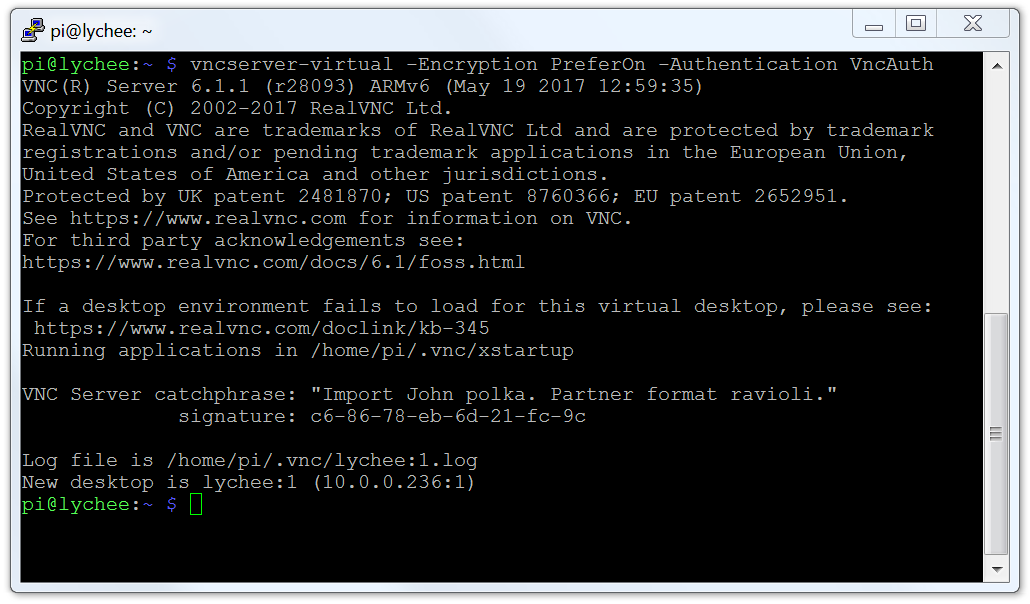
So I logged in to the raspberry via ssh and started a virtual vnc screen:


vncserver-virtual -Encryption PreferOn -Authentication VncAuth
This starts a new, virtual vnc server with the standard vnc authentications, tightvncviewer can connect to this one.

From this vnc connection I started a realvncviewer session to "localhost"


Allowing me to change the options for the default vnc server connected to the "screen" (port 5900 or :0) on the raspberry.


Accessing the options on the :0 realvnc server via realvnc viewer from a virtual (:1) realvncviewer from tightvncviewer.


From the options change Security/Authentication from "UNIX password" to "VNC password".


Now it is possible to connect directly to the realvncserver from tightvncviewer.


Thursday, January 12, 2017

Fast forwarding the std::next_permutation algorithm

I started my computer with a project that looks more and more like Sisyfos work.

It is trying to solve a puzzle by running through a set of permutations, and it is using std::next_permutation.

However, a day into the computation I realized that the algorithm could be further improved. Should I stop the calculation and restart it? Or let it continue, with the ineffective algorithm?

Looking at the internet I found an in depth explanation of std::next_permutation Implementation Explanation. std::next_permutation will from a starting point increase the permutation in an lexical fashion until it rolls over and returns false:

std::vector<int> skip_next_list = { 1,2,3,4, 5, 6, 7, 8, 9, 10, 11};
do {
//some work here
} while (std::next_permutation(skip_next_list.begin(), skip_next_list.end()));


My search had reached 309000000 when I aborted the job, so I needed to fast forward to that point. I realized that for 6 iterations (3!) it would update the last three entries of skip_next_list, for 24 (4!) the last four and so on.

So this is the skip_next_permutation function, fast forwarding to a number far into the sequence of std::next_permutation.

template<typename It> void skip_next_permutation(uint64_t skip_num, It begin, It end)
{
 if (skip_num <= 0) return; // does not have to be an error

 //build a lut of factorials, this could be a static
 std::vector<uint64_t> factorials;
 factorials.push_back(1); ///  0! == 1
 long idx = 1;
 long input_length = end - begin;
 do {
  factorials.push_back(factorials[idx-1] * idx);
 } while (factorials[++idx - 1] <= skip_num); //

 // now start to loop, find the factorial that is one smaller than the number we want to skip forward
 long my_inc = factorials.size() - 2; // always 2 lower than factorials.size()

 do
 {
  int quotient = skip_num / factorials[my_inc];
  skip_num = skip_num%factorials[my_inc]; //the remaider are the remaining skip_num

  if (skip_num == 0 && quotient == 0) goto end_loop;
  std::swap(begin[input_length - my_inc - 1], begin[input_length - my_inc + quotient - 1]);
  std::sort(begin + input_length - my_inc, end); //avoid with clever management?
  my_inc--;
 } while (my_inc >= 1);
end_loop:
 return;
}
The following table shows the factorials std::next_permutation algorithm exhausted, the number used for skip_next_permutation and the time std::next_permutation used.


Factorial
Number
Time / ms
9!
362 879
0.9
12!
39 916 799
94.1
13!
6 227 020 799
14 436.6


The fast forward function skip_next_permutation uses approximately 0.009 ms for all the values.

Monday, November 28, 2016

More sensors for Tellstick local access

After obtaining local network access to the Tellstick net I also have a wind sensor and a rain sensor close to my Tellstick net. Again, translating the Telldus .cpp code to python, the following python code gives the same results as the Telldus Live page. The code for the 1984/1994 sensors are identical except for the:
checksum = checksum + 0x1 + 0x9 + 0x8 + 0x4
vs
checksum = checksum + 0x1 + 0x9 + 0x9 + 0x4
checksum calculation. Here are the python code.
def decode2914(inp):
#source:telldus-core/service/ProtocolOregon.cpp@c9567f
#// rain
value = int(inp, 16)
messageChecksum1 = value & 0xF
value  = value >> 4
messageChecksum2 = value & 0xF
value  = value >> 4
totRain1 = value & 0xF
value  = value >> 4
totRain2 = value & 0xF
value  = value >> 4
totRain3 = value & 0xF
value  = value >> 4
totRain4 = value & 0xF
value  = value >> 4
totRain5 = value & 0xF
value  = value >> 4
totRain6 = value & 0xF
value  = value >> 4
rainRate1 = value & 0xF
value  = value >> 4
rainRate2 = value & 0xF
value  = value >> 4
rainRate3 = value & 0xF
value  = value >> 4
rainRate4 = value & 0xF
value  = value >> 4
battery = value & 0xF #// PROBABLY battery
value  = value >> 4
rollingcode = ((value >> 4) & 0xF) + (value & 0xF)
checksum =    ((value >> 4) & 0xF) + (value & 0xF)
value  = value >> 8
channel = value & 0xF
checksum = checksum + totRain1 + totRain2 + totRain3 + totRain4 + totRain5 + totRain6 +\
rainRate1 + rainRate2 + rainRate3 + rainRate4 +\
battery + channel + 0x2 + 0x9 + 0x1 + 0x4
if (((checksum >> 4) & 0xF) != messageChecksum1 or (checksum & 0xF) != messageChecksum2):
#// checksum error
return ""
totRain = ((totRain1 * 100000) + (totRain2 * 10000) + (totRain3 * 1000) +\
(totRain4 * 100) + (totRain5 * 10) + totRain6)/1000.0*25.4
rainRate = ((rainRate1 * 1000) + (rainRate2 * 100) + (rainRate3 * 10) + rainRate4)/100.0*25.4

return "%f\t%f"%(totRain, rainRate)


def decode1994(inp):
#source:telldus-core/service/ProtocolOregon.cpp@c9567f
#wind
value = int(inp, 16)
crcCheck = value & 0xF
value  = value >> 4
messageChecksum1 = value & 0xF
value  = value >> 4
messageChecksum2 = value & 0xF
value  = value >> 4
avg1 = value & 0xF
value  = value >> 4
avg2 = value & 0xF
value  = value >> 4
avg3 = value & 0xF
value  = value >> 4
gust1 = value & 0xF
value  = value >> 4
gust2 = value & 0xF
value  = value >> 4
gust3 = value & 0xF
value  = value >> 4
unknown1 = value & 0xF
value  = value >> 4
unknown2 = value & 0xF
value  = value >> 4
direction = value & 0xF
value  = value >> 4
battery = value & 0xF  #// PROBABLY battery
value  = value >> 4
rollingcode = ((value >> 4) & 0xF) + (value & 0xF)
checksum =    ((value >> 4) & 0xF) + (value & 0xF)
value  = value >> 8
channel = value & 0xF
checksum = checksum + unknown1 + unknown2 + avg1 + avg2 + avg3 + gust1 + gust2 + gust3 + direction + battery + channel
checksum = checksum + 0x1 + 0x9 + 0x9 + 0x4
if (((checksum >> 4) & 0xF) != messageChecksum1 or (checksum & 0xF) != messageChecksum2):
#// checksum error
return ""
avg = ((avg1 * 100) + (avg2 * 10) + avg3)/10.0
gust = ((gust1 * 100) + (gust2 * 10) + gust3)/10.0
directiondegree = 22.5 * direction
return '%f\t%f\t%f'%(avg, gust, directiondegree)

def decode1984(inp):
#source:telldus-core/service/ProtocolOregon.cpp@c9567f
#// wind
value = int(inp, 16)
crcCheck = value & 0xF
value  = value >> 4
messageChecksum1 = value & 0xF
value  = value >> 4
messageChecksum2 = value & 0xF
value  = value >> 4
avg1 = value & 0xF
value  = value >> 4
avg2 = value & 0xF
value  = value >> 4
avg3 = value & 0xF
value  = value >> 4
gust1 = value & 0xF
value  = value >> 4
gust2 = value & 0xF
value  = value >> 4
gust3 = value & 0xF
value  = value >> 4
unknown1 = value & 0xF
value  = value >> 4
unknown2 = value & 0xF
value  = value >> 4
direction = value & 0xF
value  = value >> 4
battery = value & 0xF  #// PROBABLY battery
value  = value >> 4
rollingcode = ((value >> 4) & 0xF) + (value & 0xF)
checksum =    ((value >> 4) & 0xF) + (value & 0xF)
value  = value >> 8
channel = value & 0xF
checksum = checksum + unknown1 + unknown2 + avg1 + avg2 + avg3 + gust1 + gust2 + gust3 + direction + battery + channel
checksum = checksum + 0x1 + 0x9 + 0x8 + 0x4
if (((checksum >> 4) & 0xF) != messageChecksum1 or (checksum & 0xF) != messageChecksum2):
#// checksum error
return ""
avg = ((avg1 * 100) + (avg2 * 10) + avg3)/10.0
gust = ((gust1 * 100) + (gust2 * 10) + gust3)/10.0
directiondegree = 22.5 * direction

return '%f\t%f\t%f'%(avg, gust, directiondegree)
Just add some more checks in the while loop
while 1:
try:
data,(address, port) = sock.recvfrom(1040)
#print data
if (data.split(":")[6][6:10]=="F824"):
#print data.split(":")[7][5:5+14]
print decodeF824(data.split(":")[7][5:5+14])
elif (data.split(":")[6][6:10]=="1984"):
#print data.split(":")[7][5:5+16]
print decode1984(data.split(":")[7][5:5+16])
elif (data.split(":")[6][6:10]=="2914"):
#print data.split(":")[7][5:5+16]
print decode2914(data.split(":")[7][5:5+16])
else:
print data
#fp.write(data + '\n');
#fp.flush()
except KeyboardInterrupt:
print "done"
#fp.close()
break
except: # time out, try again
pass


Friday, November 25, 2016

Local access to Tellstick net via python

I installed a Tellstick net and were pretty baffled that there were no obvious way to access the thing locally. At least according to my internet search.

Telldus are providing source codes for free, the only problem seems to be how the information is arranged.

By piecing together information found various places I came up with the following:

Send an udp message on port 30303, all Tellstick net devices on the local network will respond to this with a string containing some unit specific information AND the IP address on the network.

sock.sendto(DISCOVERY_PAYLOAD, (DISCOVERY_ADDRESS, DISCOVERY_PORT))
data, (address, port) = sock.recvfrom(1024)

Then send a command that will make the Tellstick net echo the sensor information back via upd:

sock.sendto("B:reglistener", (address, 42314)) #I really love those port numbers

Read the upd port and filter for the sensors you want. This is how a Oregon model F824 output could look like:

7:RawDatah5:class6:sensor8:protocol6:oregon5:modeliF824s4:datai20E1730096074Ass

There are a lot regarding decoding Oregon data on the internet, I translated the telldus-core .cpp to python.

And it works, sometimes the output can be .1C or 1% humidity off compared to my Oregon display. The values match the values from Telldus Live though.

import socket
from datetime import timedelta
import time
def decodeF824(inp):
#source:telldus-core/service/ProtocolOregon.cpp@c9567f
value = int(inp, 16)
crcCheck = value & 0xF
value = value>>4
messageChecksum1 = value & 0xF
value = value >>4
messageChecksum2 = value & 0xF
value = value >> 4
unknown = value & 0xF
value = value >> 4
hum1 = value & 0xF
value = value >> 4
hum2 = value & 0xF
value = value >> 4
neg = value & 0xF
value = value >> 4
temp1 = value & 0xF
value = value >> 4
temp2 = value & 0xF
value = value >> 4
temp3 = value & 0xF
value = value >> 4
battery = value & 0xF
value = value >> 4
rollingcode = ((value >> 4) & 0xF) + (value & 0xF)
checksum = ((value >> 4) & 0xF) + (value & 0xF)
value = value >> 8
channel = value & 0xF
checksum += unknown + hum1 + hum2 + neg + temp1 + temp2 + temp3 + battery + channel + 0xF + 0x8 + 0x2 + 0x4
if ((((checksum >> 4) & 0xF) != messageChecksum1) or ((checksum & 0xF) != messageChecksum2)):
return ""
temperature = ((temp1 * 100) + (temp2 * 10) + temp3)/10.0
if (neg):
temperature = -temperature
humidity = (hum1 * 10.0) + hum2
retStr = "class:sensor;protocol:oregon;model:F824;id:"  #14;temp:0.0;humidity:46;
retStr = '%s%d;temp:%1.1f;humidity:%d;'%(retStr,rollingcode,temperature,humidity)
return retStr


DISCOVERY_PORT = 30303
DISCOVERY_ADDRESS = '<broadcast>'
DISCOVERY_PAYLOAD = b"D"
DISCOVERY_TIMEOUT = timedelta(seconds=5)
sock = socket.socket(socket.AF_INET, socket.SOCK_DGRAM)
sock.setsockopt(socket.SOL_SOCKET, socket.SO_BROADCAST, 1)
sock.setsockopt(socket.SOL_SOCKET, socket.SO_REUSEADDR, 1)
sock.settimeout(DISCOVERY_TIMEOUT.seconds)
sock.sendto(DISCOVERY_PAYLOAD, (DISCOVERY_ADDRESS, DISCOVERY_PORT))
data, (address, port) = sock.recvfrom(1024)
print data, address, port
time.sleep(1)
#fp = open("tellstick.data", "w")
print "listening..."
#UDPSock.sendto("A:disconnect", (address,42314)) #will reboot the Tellstick net
sock.sendto("B:reglistener", (address, 42314))
while 1:
try:
data,(address, port) = sock.recvfrom(10240)
print data
if (data.split(":")[6][6:10]=="F824"):
print decodeF824(data.split(":")[7][5:5+14])
#fp.write(data + '\n');
#fp.flush()
except KeyboardInterrupt:
print "done"
#fp.close()
break
except: # time out, try again
pass

Wednesday, October 12, 2016

A license system using Crypto++ with RSA keys

If someone really wants to hack your software they can. Sony tried to make copying impossible and ended up in court. My take is the same as when I lock my bike. It is not difficult to take the bike but you have to make a thief of yourself in order to do it.

Crypto++ is found here.

Step one in this process is to obtain some specifics regarding the hardware of the PC running your software. Serial numbers from hard drives, volume serial numbers, amount/speed of RAM. Anything can be used, note also the possible hassle your paying customers will suffer if they do anything to their PC at a later stage.

Hash this number, for Crypto++ this could be done something like this:

std::string SHA256HashString(std::string aString) {
 std::string digest;
 CryptoPP::SHA256 hash;

 CryptoPP::StringSource foo(aString, true,
  new CryptoPP::HashFilter(hash,
   new CryptoPP::HexEncoder(
    new CryptoPP::StringSink(digest))));

 return digest;
}
Make your customer send you this number. It is not feasible to recreate their hardware ID from this hash.


Step two is preparing your private and public keys.

 AutoSeededRandomPool rng;

 ...

 RSA::PrivateKey rsa_private;
 rsa_private.GenerateRandomWithKeySize(rng, 512); //select your keysize here
 bool isok = rsa_private.Validate(rng, 3);//Always check certificates your
       //program reads from external sources
 ByteQueue private_queue;
 rsa_private.Save(private_queue);

 FileSink private_file_sink("private.bin");
 private_queue.CopyTo(private_file_sink);
 private_file_sink.MessageEnd();

Just save the private key as a binary, nobody will look into this file, you could choose to do the same with the public key. I chose to hard code this file into my application, so I will save it as a base64 encoded string.

 RSA::PublicKey rsa_public(rsa_private);
 isok = rsa_public.Validate(rng, 3);
 ByteQueue public_queue;
 rsa_public.Save(public_queue);
 string ss_base64;
 Base64Encoder base64encoder_sink(new StringSink(ss_base64));
 public_queue.CopyTo(base64encoder_sink);
 base64encoder_sink.MessageEnd();
 cout << ss_base64 << endl;

 ofstream file_b64("public.b64");
 file_b64 << ss_base64;
 file_b64.close();

Step three is signing a file containing the information from step one. For me this a line containing the customers name and a line containing the hardware id hash.

 RSASSA_PKCS1v15_SHA_Signer signer(rsa_private);
// Create signature space
 size_t length = signer.MaxSignatureLength();
 SecByteBlock signature(length);

 // Sign message
 length = signer.SignMessage(rng, (const byte*)message.c_str(),
  message.length(), signature);

 // Resize now we know the true size of the signature
 signature.resize(length);

 string sig_string((char*)signature.data(), signature.size());
 Base64Encoder encoder;
 encoder.Put((byte*)sig_string.c_str(), sig_string.size());
 encoder.MessageEnd();
 word64 size = encoder.MaxRetrievable();
 string encoded;
 if (size)
 {
  encoded.resize(size);
  encoder.Get((byte*)encoded.data(), encoded.size());
 }
 cout << encoded << endl;
 ofstream file_b642("signature.b64");
 file_b642 << encoded;
 file_b642.close();

In order to keep everything in one file I now append the base 64 signature to the customer information.


 Customer name, place
 hardware id hash
 ----
 mflkdhjgs6fdli9456fjgdklSDGty5ftgd
 MDSWFrt+wegGgGmorebase64charshere


I will call this file "license.txt" and send it to the customer.

Step four. My application reads the hardware info, hashes it and compares it with the hash in the license.txt file. If it matches I will verify the hash with the signature. This way I know the hardware hash is not just copied.
A routine to decode base 64:

string b64_decoder(string b64_str)
{
 Base64Decoder b64_decoder;
 b64_decoder.Put((byte*)b64_str.data(), b64_str.size());
 b64_decoder.MessageEnd();
 string decoded_str;
 word64 size = b64_decoder.MaxRetrievable();
 if (size && size <= SIZE_MAX)
 {
  decoded_str.resize(size);
  b64_decoder.Get((byte*)decoded_str.data(), decoded_str.size());
 }
 else
 {
  decoded_str = "";
 }
 return decoded_str;
}
Step five recreates the public certificate, creates a verifier and checks the message vs the signature. Begin by debase64 both the public key and the signature:


 size_t pos = license_txt.find("----", 0); //Check your findings...
 string message_txt = trim(license_txt.substr(0, pos));
 string signature = b64_decoder(trim(license_txt.substr(pos + 4)));

 string public_b64 = "hm+560dXdR4dmorebase64charshere"

//rsa_public
 string rsa_public_str = b64_decoder(public_b64);
 RSA::PublicKey rsa_public;
 StringSource stringSource(rsa_public_str, true);
 rsa_public.BERDecode(stringSource);
 if (!rsa_public.Validate(rng, 3))
 {
  //if this is wrong someone has actually tampered with the code
 }
// Verifier object
 RSASSA_PKCS1v15_SHA_Verifier verifier(rsa_public);

 // Verify
 bool result = verifier.VerifyMessage((const byte*)message_txt.c_str(),
  message_txt.length(), (const byte*)signature.data(), signature.size());

 // Result
 if (true == result) {
  cout << "All OK" << endl;
 }
 else {
  cout << "bah bah baaaaa" << endl;
 }
Well, this is my implemetion at least.