Wednesday, October 12, 2016

A license system using Crypto++ with RSA keys

If someone really wants to hack your software they can. Sony tried to make copying impossible and ended up in court. My take is the same as when I lock my bike. It is not difficult to take the bike but you have to make a thief of yourself in order to do it.

Crypto++ is found here.

Step one in this process is to obtain some specifics regarding the hardware of the PC running your software. Serial numbers from hard drives, volume serial numbers, amount/speed of RAM. Anything can be used, note also the possible hassle your paying customers will suffer if they do anything to their PC at a later stage.

Hash this number, for Crypto++ this could be done something like this:

std::string SHA256HashString(std::string aString) {
 std::string digest;
 CryptoPP::SHA256 hash;

 CryptoPP::StringSource foo(aString, true,
  new CryptoPP::HashFilter(hash,
   new CryptoPP::HexEncoder(
    new CryptoPP::StringSink(digest))));

 return digest;
}
Make your customer send you this number. It is not feasible to recreate their hardware ID from this hash.


Step two is preparing your private and public keys.

 AutoSeededRandomPool rng;

 ...

 RSA::PrivateKey rsa_private;
 rsa_private.GenerateRandomWithKeySize(rng, 512); //select your keysize here
 bool isok = rsa_private.Validate(rng, 3);//Always check certificates your
       //program reads from external sources
 ByteQueue private_queue;
 rsa_private.Save(private_queue);

 FileSink private_file_sink("private.bin");
 private_queue.CopyTo(private_file_sink);
 private_file_sink.MessageEnd();

Just save the private key as a binary, nobody will look into this file, you could choose to do the same with the public key. I chose to hard code this file into my application, so I will save it as a base64 encoded string.

 RSA::PublicKey rsa_public(rsa_private);
 isok = rsa_public.Validate(rng, 3);
 ByteQueue public_queue;
 rsa_public.Save(public_queue);
 string ss_base64;
 Base64Encoder base64encoder_sink(new StringSink(ss_base64));
 public_queue.CopyTo(base64encoder_sink);
 base64encoder_sink.MessageEnd();
 cout << ss_base64 << endl;

 ofstream file_b64("public.b64");
 file_b64 << ss_base64;
 file_b64.close();

Step three is signing a file containing the information from step one. For me this a line containing the customers name and a line containing the hardware id hash.

 RSASSA_PKCS1v15_SHA_Signer signer(rsa_private);
// Create signature space
 size_t length = signer.MaxSignatureLength();
 SecByteBlock signature(length);

 // Sign message
 length = signer.SignMessage(rng, (const byte*)message.c_str(),
  message.length(), signature);

 // Resize now we know the true size of the signature
 signature.resize(length);

 string sig_string((char*)signature.data(), signature.size());
 Base64Encoder encoder;
 encoder.Put((byte*)sig_string.c_str(), sig_string.size());
 encoder.MessageEnd();
 word64 size = encoder.MaxRetrievable();
 string encoded;
 if (size)
 {
  encoded.resize(size);
  encoder.Get((byte*)encoded.data(), encoded.size());
 }
 cout << encoded << endl;
 ofstream file_b642("signature.b64");
 file_b642 << encoded;
 file_b642.close();

In order to keep everything in one file I now append the base 64 signature to the customer information.


 Customer name, place
 hardware id hash
 ----
 mflkdhjgs6fdli9456fjgdklSDGty5ftgd
 MDSWFrt+wegGgGmorebase64charshere


I will call this file "license.txt" and send it to the customer.

Step four. My application reads the hardware info, hashes it and compares it with the hash in the license.txt file. If it matches I will verify the hash with the signature. This way I know the hardware hash is not just copied.
A routine to decode base 64:

string b64_decoder(string b64_str)
{
 Base64Decoder b64_decoder;
 b64_decoder.Put((byte*)b64_str.data(), b64_str.size());
 b64_decoder.MessageEnd();
 string decoded_str;
 word64 size = b64_decoder.MaxRetrievable();
 if (size && size <= SIZE_MAX)
 {
  decoded_str.resize(size);
  b64_decoder.Get((byte*)decoded_str.data(), decoded_str.size());
 }
 else
 {
  decoded_str = "";
 }
 return decoded_str;
}
Step five recreates the public certificate, creates a verifier and checks the message vs the signature. Begin by debase64 both the public key and the signature:


 size_t pos = license_txt.find("----", 0); //Check your findings...
 string message_txt = trim(license_txt.substr(0, pos));
 string signature = b64_decoder(trim(license_txt.substr(pos + 4)));

 string public_b64 = "hm+560dXdR4dmorebase64charshere"

//rsa_public
 string rsa_public_str = b64_decoder(public_b64);
 RSA::PublicKey rsa_public;
 StringSource stringSource(rsa_public_str, true);
 rsa_public.BERDecode(stringSource);
 if (!rsa_public.Validate(rng, 3))
 {
  //if this is wrong someone has actually tampered with the code
 }
// Verifier object
 RSASSA_PKCS1v15_SHA_Verifier verifier(rsa_public);

 // Verify
 bool result = verifier.VerifyMessage((const byte*)message_txt.c_str(),
  message_txt.length(), (const byte*)signature.data(), signature.size());

 // Result
 if (true == result) {
  cout << "All OK" << endl;
 }
 else {
  cout << "bah bah baaaaa" << endl;
 }
Well, this is my implemetion at least.

Friday, January 22, 2016

Obtaining the external WAN IP address from a Netgear WNR2000v5

Earlier I used a DNS service in order to get the IP address of my internet connection. I used some free ones, and they worked very well. Until they didn't work.

Then I used an external server, like duckduckgo.com, utilizing the computer, with python, already running in my house. Something like:

adr = "https://duckduckgo.com/?q=what+is+my+ip&ia=answer"
req = urllib2.Request(adr)
res = urllib2.urlopen(req)
data = res.read()
res.close()
...
p = re.compile('\"Answer\":"Your IP address is (\d*).(\d*).(\d*).(\d*) in')
m = p.search(data)
...
current_ip = (m.groups()[0], m.groups()[1], m.groups()[2], m.groups()[3])
...

This data were then uploaded to a know web page if it were different from the previous address.

And that worked great, until I occasionally started to use a VPN service on the machine running the script. Then duckduckgo.com returned the IP address of my VPN, which would not forward my ssh logins to my home.


So I checked my router, Netgear WNR2000v5, and it returned the IP address as expected. But only from the page "RST_conn_status.htm". It would also return "Access denied" for the first login attempt if someone had logged in to the router for another machine. And it required a username/password.

The script then became:

username='admin'
password='password'
adr = 'http://10.0.0.1/RST_conn_status.htm'
try:  #if someone else logged in to the router we get access denied the first time
 req = urllib2.Request(adr)
 base64string = base64.encodestring('%s:%s'%(username, password)).replace('\n', '')
 req.add_header("Authorization", "Basic %s" % base64string)   
 res = urllib2.urlopen(req)
except:
 time.sleep(1)
req = urllib2.Request(adr)
base64string = base64.encodestring('%s:%s' % (username, password)).replace('\n', '')
req.add_header("Authorization", "Basic %s" % base64string)   
res = urllib2.urlopen(req)
time.sleep(1)
data = res.read()
res.close()
...
p = re.compile('var info_get_wanip=\"(\d*).(\d*).(\d*).(\d*)\";')
m = p.search(data)
...
current_ip = (m.groups()[0], m.groups()[1], m.groups()[2], m.groups()[3])
...


Saturday, October 4, 2014

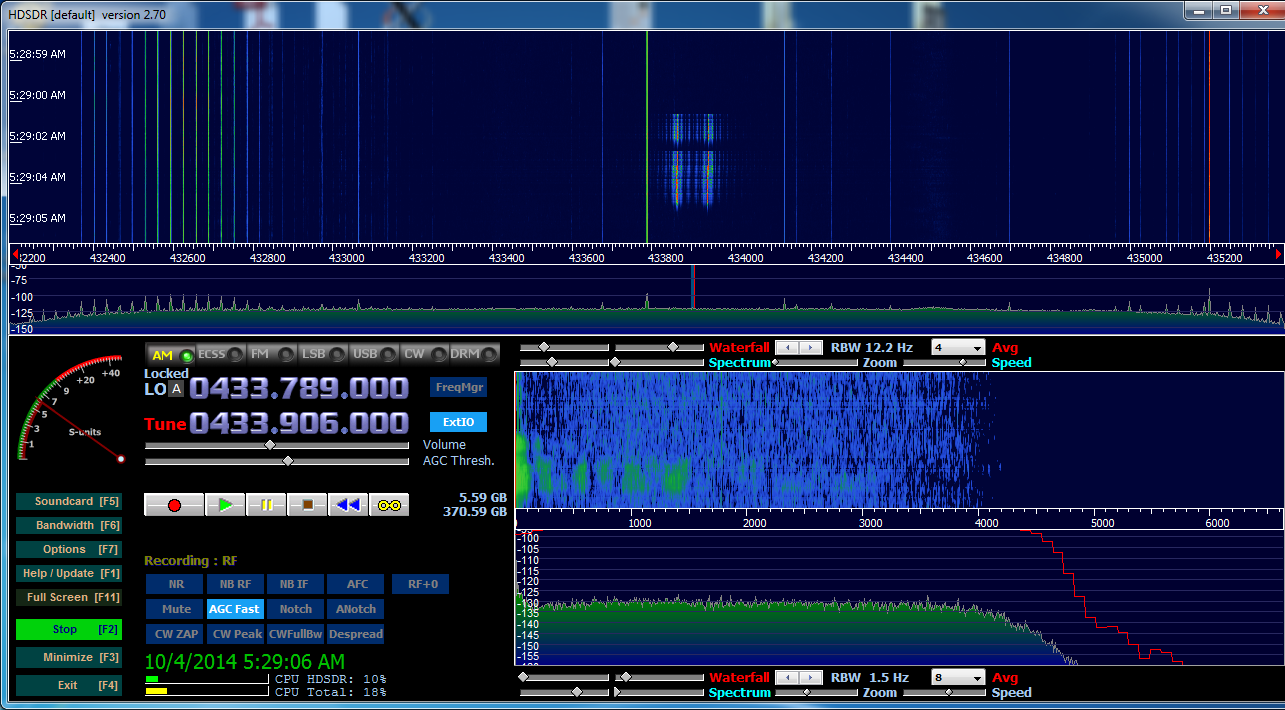
Studying the TPMS signals from Subaru a.k.a. Schrader signals

1) Observing the car at standstill produced no signals. Even after driving.

Data collection: So far windows and HDSDR have been used. SDR# is not available to me, Neither a portable coputer with gnuradio. Recordings produced files that ended like this: 433789kHz_RF.wav Stereosignals in Audacity with something that looked like quadrature detection. Is this the I/Q?

2) While driving, an some signals were registered, approx one every 14 seconds.


The first part of the signal is constant, the second part varies.  48 bits. 8 first bits a short pulse. The second part is closer to the resonance frequency. Driving on, I never manage to observe this signal again. Maybe a local, exterior signal?


3) After some fiddeling with parameters, some other signal are observed.

I first processed these data with a low pass filter, then a normalization. Not wise, a repeating signal is also observed without the initial low pass filter:


Eight groups of packets, separated by 100 ms.


The packets are not yet analyzed, could this signal shape indicate FSK? Seems to be three different pulse lengths in the packet.  Like Jared Boon is taking about here.

Screendump from HDSDR:


Monday, September 29, 2014

Decoding Biltema Weatherstation 84086 / sensor 84056


This weather station is sold with one remote sensor and a base station capable of monitoring airpressure. It also have a radio controlled clock.

The remote sensor is capable of measuring temperature and pressure and broadcast this information on the 433 MHz band.

Using a 433 MHz receiver together with a logic analyzer several things could be learned:

The sensor transmit 20 bits of information starting with a 1.45 ms pulse followed by 1.50 ms silence. Pulses 2.16 ms long followed by 0.77 ms silence is '1', and 0.70 ms pulses followed by 2.23 ms silence is representing '0'.


Channel 2, -16.6C, 20% humidity

Several different measurements obtained with varying temperatures and constant humidity (36% (0b100100)) showed that the sensor transmitted the humidity in the seven last bits of the transmission.

The last seven bits is arranged in the following fashion: bit 1, 0 , 6, 5, 4, 3 and 2.

Yeah, and after some googling I found that the decoded signals were presented at telldus.com.

In the following table this decoding is used with the exception of me rotating the bitorder.


Tuesday, April 8, 2014

Turning NEXA recievers on and off from the light switch

So, the switch in question is divided into three parts, for controlling three different lights. One of these is an outlet located close to the ceiling, just above a cupboard.

The most elegant solution would be to hook this outlet up to the device controlling the Nexa switches. Power comes on, send signal for turning on the Nexa switches. Power dissapears, send signal for turning off the Nexa switches.

This requires us to detect the power off from the outlet and send the OFF signal before the power is totally gone.


Using a 9V (more like 12V) 200 mA AC adaptor and hooking the outputs of this circuit to a atiny13A MCU and a standard Itead 433 MHz radio, using the attiny13a to detect when the voltage dropped from 'V detect' the following were obtained:

R1 360 Ohm
R2 180 Ohm
D1 1N4001
C1  1000uF, 50V
Radio operates 650 ms after 'V detect' goes low.

Since the Nexa transmission requires ca. 400 ms, no modifications to this setup were necessary. The NEXA protocol is described here.


The attiny13A is programmed to send the ON signal when the power comes on. It then enters a loop waiting for the voltage indicator to drop and then sends the OFF signal.


Voltage drops at '1', radio stops sending at '2'.

 /*
  * Lysbryter.c
  *
  * Created: 4/6/2014 12:11:38 PM
  * Author: hwa
  */  
 #define F_CPU 8000000
 #include <avr/io.h>
 #include <util/delay.h>
 #define RPORT PINB0
 void send_signal(uint32_t ID, uint8_t GRP, uint8_t ON, uint8_t UNIT);
 void pulse();
 void pulse()
 {
      PORTB |= (1<<RPORT);
      _delay_us(230);
      PORTB &= ~(1<<RPORT);
 }
 // delays determining '0' or '1'
 #define SHORTDELAY 400
 #define LONGDELAY 1420
 void send_signal(uint32_t ID, uint8_t GRP, uint8_t ON, uint8_t UNIT)
 {
      uint16_t t1,t2;
      t1 = (ID>>10);
      t2 = (ID<<6);
      if (GRP==1)
      {
           t2 |=1<<5; //Group command
      }
      if (ON==1)
      {
           t2 |= 1<<4; //ON
      }
      // ORin UNIT
      t2 = t2 | (UNIT & 0x0F);
      pulse();
      _delay_us(1000);
      _delay_us(1000);
      _delay_us(825);
      for (int i =15;i>=0;i--)
      {
           if (((t1) & (1 << i)) == 0)//Console::WriteLine("0");
           {
                pulse();
                _delay_us(SHORTDELAY);
                pulse();
                _delay_us(LONGDELAY);
           }                
           else//Console::WriteLine("1");
           {
                pulse();
                _delay_us(LONGDELAY);
                pulse();
                _delay_us(SHORTDELAY);
           }
      }
      for (int i =15;i>=0;i--)
      {
           if (((t2) & (1 << i)) == 0)//Console::WriteLine("0");
           {
                pulse();
                _delay_us(SHORTDELAY);
                pulse();
                _delay_us(LONGDELAY);
           }                
           else//Console::WriteLine("1");
           {
                pulse();
                _delay_us(LONGDELAY);
                pulse();
                _delay_us(SHORTDELAY);
           }
      }
      pulse();
 }
 int main(void)
 {
      int nopower = 0;
      //DDRB &= ~(1<<PINB4);
      DDRB=0;
      DDRB |= (1<<PINB0); // output
      PORTB &= ~(1<<PINB0); //off
      //PORTB &= ~(1<<PINB4); //pullup
      _delay_ms(100);
      // send turn on signal to the group
      for (int i =0;i<7;i++)
      {
           send_signal(0x280526, 1,1,0);
           _delay_ms(11);
      }
   while(1)
   {
            if(bit_is_clear(PINB, PINB4))  
            {
                nopower = 1;  
           }          
           if (nopower==1)
           {
                for (int i =0;i<7;i++)
                {
                     send_signal(0x280526, 1, 0, 0); //off
                     _delay_ms(11);
                }
           }
      }
 }

Looking at the source code it is apparent that one could have used a function 'calculate_signalstring' which returned the bits to send thus eliminating the need for recomputation each time 'send_signal' was executed. '0x280526' is the ID code for my Nexa remote.


Signal from the ATtiny13A
It did appear that the reciever were forgiving with the exact pulsewidth and pulse delays in the sequence. Two initial adjustments were all it took to make the reciever accept the signal.
Signal from the NEXA remote
Looking at the last six bits of these patterns it is apparent that the attiny13A is sending the group/off signal while the remote sends the unit 1 on signal.

Thursday, December 26, 2013

More on observing the 433MHz band, Nexus IW004

One of the Christmas gifts in the family this year was a weather station, "Nexus IW004 / 36-5136". Some 'googling' of the brand got me to one of the local gadget stores in the region, Clas Ohlson. It is capable of measuring indoor and outdoor temperature and humidity, air pressure and the date. It also predicts the upcoming weather based on these data. The outdoor unit includes a sensor with mounting possibilities attached to the unit with a 1 meter wire.

Analysing the data with a 433 MHz receiver unit and a logic analyser showed a burst of twelve identical signals, 3.9 ms apart, for each reading of outdoor status. For channel 1 these bursts were located 56.95 seconds apart. For channel 2, 67.05 seconds and for channel 3 84.97 seconds apart.

Each pulse is 0.47 ms wide, with 1.98 ms separating 'ones' and 0.99 ms separating 'zeros'. The last pulse in a 'burst' is narrower, 0.25 ms wide.


Using this information and by varying the environmental parameters the following table could be compiled:


bit  1 - 10  Sensor ID and battery status(?)
bit 11 - 12  Channel ID
bit 13 - 24  Temperature * 10 in two's complement notation
bit 25 - 28  Always 1
bit 29 - 36  Humidity


Something also happens in bit 3 - 7 when the channel changes on the outdoor sensor.

Friday, July 26, 2013

Using the Nexa remote together with a tellstick device

One of my Nexa switches is operated programmaticly from a computer via a tellstick. Whenever I want to control this device manually I will log in to the computer and issue the proper commands to operate the switch. However, not everybody finds this procedure acceptable so I needed a way to operate the switch both from the tellstick and from a Nexa remote.

First I reprogrammed the Nexa switch to accept the Nexa remote.

Then, by using the hard- and software described in decoding-new-nexa-protocol I could extract the ID code sent from the Nexa remote. This ID code could be directly entered into the "/etc/tellstick.conf" file and after a restart of the tellstick daemon the switch were operable by both the Nexa remote and the tellstick.